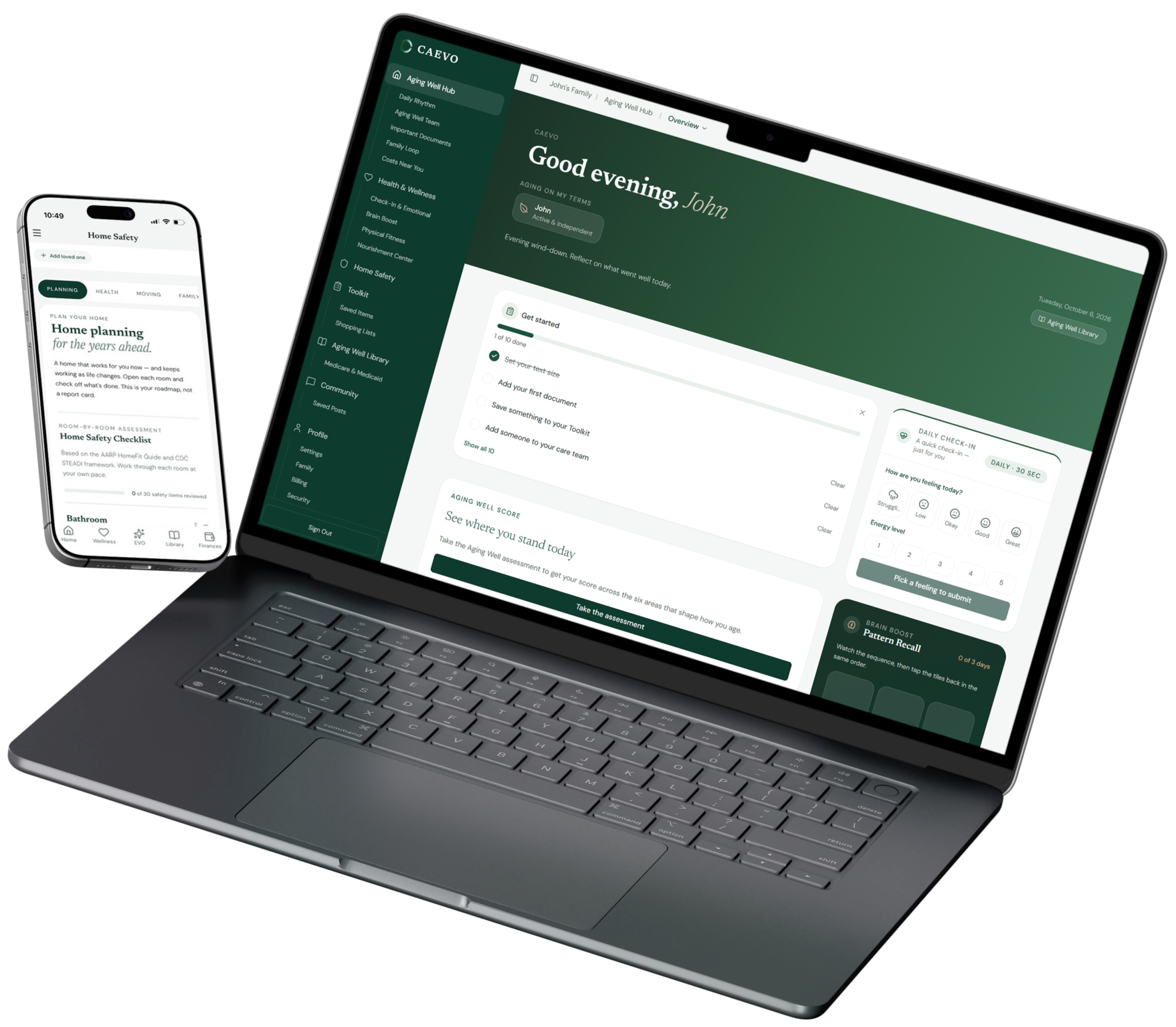
Caregiving App Tutorials
Get the most out of CAEVO
Step-by-step guides and videos for setting up your hub, managing family sharing, and using every feature CAEVO offers. Every walkthrough is written out in full, numbered steps and screenshots you can follow at your own pace, or print and keep beside you.
• Key Document Planning and Sharing • Easy Family Communication • Recommended Next Steps • Financial Resources • Aging Well Index • Document Vault • Benefits Finder • Care Stage Tracker • Family Loop • Consent-first Sharing • Ask EVO • 256-bit Encryption • No ads, ever
Seven Walkthroughs, One Job Each
These are the written companions to the Learning Studio videos. Pick the one that answers the question in front of you right now. You don’t have to work through them in order.
Getting Started With CAEVO
1
Signing in and finding your way around
Create your account, land on the Caregiver Hub, and learn what each door on the main screen is for.
2
Adding family, a loved one and your care circle
Add the person you're caring for, then invite the siblings, spouse, or friends who need to see what's happening.
3
Adding medications and logging the doses
Build the medication list once, then log doses so the record is ready when the doctor asks.
4
The tools worth knowing about
Family Ready Folder, Care Rhythm, the Financial Tracker and the calculators, and what each one is actually for.
5
Your path in the Aging Well Library
How the library is organized by stage, and how to find the guidance written for where you are now.
6
Getting started with your Aging Well assessment
The eight-step assessment behind your Aging Well Score, and what the number is telling you.
7
Move, eat, and think well
The four daily sections under Health and Wellness: movement, nourishment, brain boost, and the daily check-in.
Watch and Learn
Prefer watching to reading? Every guide above has a short video companion in the Learning Studio.
Frequently Asked Questions
Is CAEVO for caregivers or for people planning their own aging?
Both. Every account has both hubs, and you can add and switch between more than one family, like a spouse’s parents and your own.
Is CAEVO free?
To start, yes. Essentials is free, always, for one person. It includes both libraries and the everyday tools on each side, with no credit card required.
Is my family's information safe?
Yes. It’s encrypted with bank-level, 256-bit security and stored on US infrastructure, and the person aging controls what’s shared. See how we protect your data
Will I see everything about my parent?
No, you see what they choose to share. That’s on purpose. It keeps CAEVO from feeling like it’s watching anyone.
Can CAEVO find benefits I qualify for?
It shows you the programs in your state and county, like waivers, transportation, meals, respite, and legal aid, across all 50 states and DC.
My advisor, attorney, home care agency, or community offered me CAEVO. Do I pay?
If your organization covers it, you don’t need a paid plan. Check with them, or contact us to confirm before you sign up for anything.

Built from lived experience.
We watched people we love care for people they love, through cancer, dementia, and a fall that changed everything overnight. That is why CAEVO exists.
As we watched our own parents age, we saw something bigger than caregiving. They wanted to live their lives more fully, and their families wanted to support them through every chapter. Plan early, and it is a conversation around the kitchen table.
Lauren Howard & Jon Howard · Co-founders
What families are saying — on both sides of care
“A few months ago, there was a change in my father in law’s wife’s health. All the questions showed up. We started realizing how much of this process and what was to come was an unknown to us. It was scary and confusing to say the least. We heard about CAEVO and realized after a little investigation that it was the resource we needed. Memory loss and early dementia was in the future. CAEVO gave our family a guide and the resources we needed. Forever grateful for this resource and the team who made it happen. “
Kieth P., CAEVO User
“Great product and a huge stress relief. My parents are both approaching 80 and I’m fairly unorganized as it is. CAEVO has helped keep tabs and important info on my parents at my fingertips without stressing or sacrificing time with my kids.”
Nick F., CAEVO User
“I’m also a user, and here’s my honest take.
I used CAEVO to help plan care for my dad. My sister and I are his co-conservators, and keeping track of everything was a mess.
If you’re caring for a parent or planning for your own later years, it’s worth downloading.”
John G., CAEVO User
Stay Informed

The Conversation Nobody Wants to Have With Their Parents (and How to Start It)
Most families wait for a crisis to talk about aging. Here’s how to open the conversation before you’re forced to — and what to actually ask.

Sandwich Generation, Meet Your New To-Do List
Managing your kids’ schedules and your parents’ care at the same time isn’t a time-management problem — it’s a coordination problem. Here’s what that actually looks like.

The Conversation Nobody Wants to Have With Their Parents (and How to Start It)
Most families wait for a crisis to talk about aging. Here’s how to open the conversation before you’re forced to — and what to actually ask.

The Conversation Nobody Wants to Have With Their Parents (and How to Start It)
Most families wait for a crisis to talk about aging. Here’s how to open the conversation before you’re forced to — and what to actually ask.
Ready to Put What You've Learned Into Practice?
Available on